Your clothes. A clearer picture.
How to photograph clothes for a digital wardrobe.
A useful wardrobe photo helps you recognise a piece later. Start with one familiar garment, show it clearly, and check that the saved image still looks like the clothes you own.
Start with a favourite
Choose something you wear often. You already know its colour, shape and small details, so you can spot anything that changes in a generated image.
Lay it out or use a hanger, with the whole garment inside the frame. Give sleeves and hems room. Use a simple background and even light. Before moving on, check that you can see the neckline, sleeves, hem and any pattern.
A real example, worth a closer look
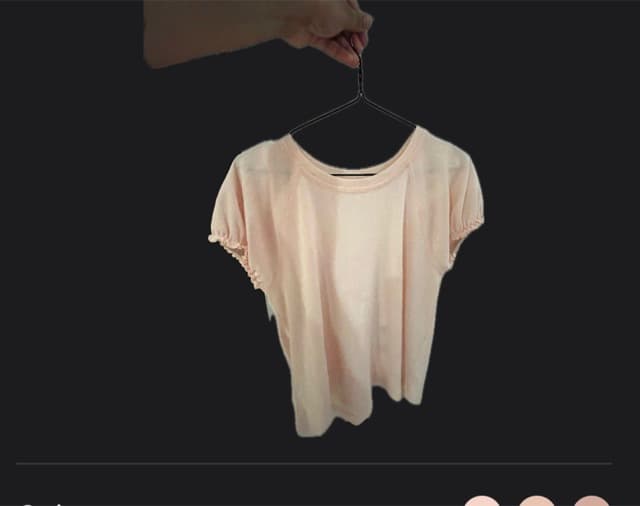
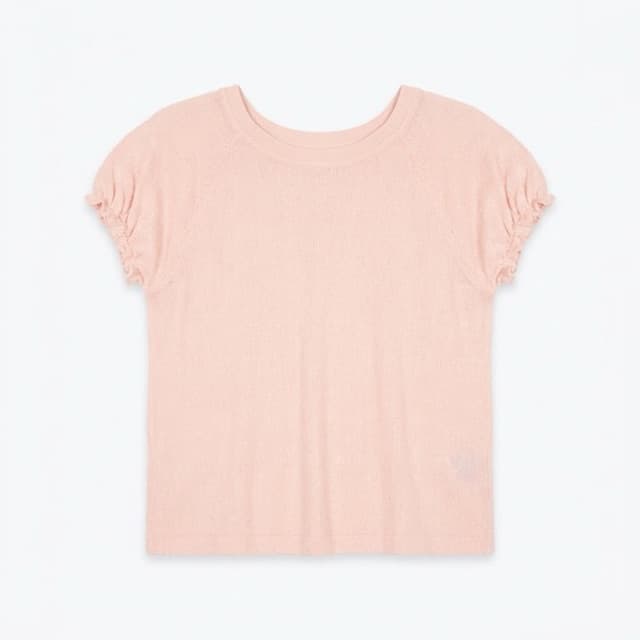
The catalogue image removes the hand, hanger and background. But look closely: the colour appears pinker and the sleeves look more gathered. A tidier picture is a reason to check the result, not proof of an exact match.
Check before you save
Does it still look like your garment? Compare colour, print, neckline, sleeve shape and length with the real piece. A pretty picture is less useful if it makes you confuse one item with another.
Would you find it by that name? Treat suggested names, categories and colours as a starting point. Use words you would remember when looking for it later.
Keep the care label as your reference. A clothing photo cannot tell you how to wash it. If you scan a label for a readable guide, compare the result with the original label.
Build a small wardrobe first
Add a few favourites and see how easily you can find them. Keep the details a photo cannot show: how a piece fits, how comfortable it feels, or something you always forget.
Attiro is coming soon to iOS and Android. Join the waitlist for launch updates and your first 30 days free.